TL;DR
Open a free Amazon Business account
Business pricing, bulk buying and tax-exempt orders.
Create a free accountAs an affiliate, we earn on qualifying purchases.
A steam mop may stop producing steam due to blocked nozzles, faulty heating elements, or water supply issues. Regular maintenance, proper use, and understanding recent tech improvements can fix most problems and prolong your device’s life.
Nothing beats the satisfying rush of a steam mop that works perfectly—clean floors and fresh scent in seconds. But when your trusty cleaner suddenly stops steaming, it’s frustrating. You might wonder if it’s time to replace it or if a simple fix exists.
This guide breaks down why your steam mop isn’t producing steam and offers practical tips to get it back in action. Whether it’s a clogged nozzle or a heating glitch, understanding the basics can save you money and extend your device’s lifespan.
Always use filtered or distilled water to prevent mineral buildup that clogs nozzles.
Regularly clean nozzles and descale your device to maintain consistent steam output.
Inspect power cords and switches for damage—electrical faults are common causes of no-steam issues.
Modern steam mops feature self-cleaning and smart sensors, making maintenance easier.
If troubleshooting doesn’t restore steam, replacing the device may be the better choice.
Why Your Steam Mop Isn’t Steaming — The Common Culprits
The most frequent reasons for a no-steam situation are simple to identify. First, check if the water supply is working properly. If the water tank is empty or not seated correctly, no steam will come out.
Next, mineral deposits from hard water can clog tiny nozzles, blocking steam flow. These deposits act like a barrier, preventing water from vaporizing efficiently, which leads to weak or no steam. A malfunctioning heating element, which is responsible for converting water into steam, is another common cause—if it’s damaged or not reaching the right temperature, steam production halts. Electrical faults, like damaged cords or switches, can also prevent the unit from heating properly, leaving you with a warm device that’s not steaming. Lastly, incorrect temperature settings or a damaged water tank—such as cracks or leaks—reduce pressure and steam output, making your cleaning less effective and potentially damaging the internal components over time.
Understanding these causes helps you prioritize what to check first, and recognizing the implications—like mineral deposits leading to long-term clogging—can guide better maintenance routines to prevent future issues.
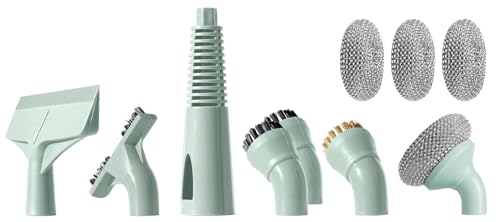
Newbealer 11 Pieces Brush Heads, Mop Parts for All-in-1 Steam Mop NB602N
- Compatible with Newbealer Steam Mop: Fits NB602N model and replacements
- Complete 11-Piece Set: Includes brushes, nozzle, squeegee, and more
- Versatile Cleaning Tools: Hard-to-reach, window, and deep cleaning
As an affiliate, we earn on qualifying purchases.
As an affiliate, we earn on qualifying purchases.
Quick Fixes: How to Troubleshoot Your Steam Mop in 5 Easy Steps
- Check that the water tank is full and properly seated—sometimes a loose tank blocks water flow, leading to insufficient steam production. Ensuring it’s correctly positioned guarantees water reaches the heating element.
- Clear any visible blockages or mineral buildup in the nozzles using a needle or small brush. Over time, mineral deposits can harden and form a barrier, so removing these ensures unobstructed steam flow.
- Inspect the power cord and switch for damage; replace if necessary. Damaged electrical components can prevent the device from heating properly, so addressing these issues is crucial for safe operation.
- Allow the device to warm up fully—most take 30 seconds to 2 minutes to reach steaming temperature. Rushing this process can result in weak steam or no output, so patience ensures optimal performance.
- Test with distilled water to see if mineral deposits were the cause of clogging. Using distilled water reduces mineral buildup, which is a major factor in clogging and reduced steam efficiency over time.
If these steps don’t work, consider descaling the device or replacing worn parts. Recognizing when simple troubleshooting isn’t enough can save you from unnecessary repairs or premature replacement.

Steam & Go Demineralized Water for Steam Mop – Eucalyptus Mint Scent, 128 oz (Pack of 1) | Scented Floor Cleaner Solution, Ready-to-Use, Compatible with Any Steam Cleaner
- Prevents Limescale Buildup: Stops mineral deposits from clogging your steam mop
- PVC-Free Formula: Safe for hardwood, tile, stone, and grout
- Eucalyptus Mint Scent: Naturally freshens rooms without chemicals
As an affiliate, we earn on qualifying purchases.
As an affiliate, we earn on qualifying purchases.
Comparison Table: Traditional vs. Modern Steam Mops
| Feature | Traditional Steam Mops | Latest Models |
|---|---|---|
| Heating Time | Up to 3 minutes | Under 30 seconds |
| Descaling Features | Manual cleaning required | Automatic or self-cleaning cycles |
| Water Type | Tap water often causes mineral buildup | Designed for filtered or distilled water |
| Steam Output Consistency | Varies with blockages and wear | More stable, with smart sensors |
| Durability | Moderate, prone to clogging | Improved with advanced materials and tech |
Understanding the differences between traditional and modern steam mops helps you choose a model that aligns with your cleaning needs and maintenance capacity. Modern units tend to incorporate smarter technology and self-cleaning features, which significantly reduce downtime and maintenance effort. However, they still rely on proper use and regular descaling to perform optimally, especially when using hard water. Recognizing these tradeoffs can help you invest wisely and extend the lifespan of your device.

BISSELL EUCALYPTUS MINT DEMINERALIZED STEAM MOP WATER, 32 ounces, 1392, WHITE
- Supports Pet Foundation: Every purchase helps save pets
- Fresh Eucalyptus Mint Scent: Leaves a pleasant aroma during cleaning
- Demineralized Water: No harmful chemicals or fumes
As an affiliate, we earn on qualifying purchases.
As an affiliate, we earn on qualifying purchases.
How to Keep Your Steam Mop Working Like New
- Use filtered or distilled water—hard water is the main enemy of steam outlets because it deposits minerals that clog nozzles and reduce efficiency. Prioritizing water quality is a simple yet impactful step to prolong your device’s life.
- Clean nozzles regularly with a needle or small brush to remove mineral deposits. Consistent cleaning prevents buildup from hard water, which can lead to uneven steam output and eventual clogging.
- Follow manufacturer instructions for descaling, especially if you notice reduced steam output or longer heat-up times. Proper descaling prevents mineral accumulation from turning into stubborn blockages that are difficult to remove later.
- Inspect power cords and switches periodically for damage; electrical faults are common causes of no-steam issues. Addressing these early reduces safety risks and ensures reliable operation.
- Store the device upright in a dry place to avoid leaks and internal moisture damage. Proper storage preserves internal components and prevents corrosion, extending overall device lifespan.
Perform these simple steps every few months to keep your steam mop in top shape and prevent unexpected failures. Regular maintenance not only keeps your device running efficiently but also saves you money on repairs or replacements down the line.
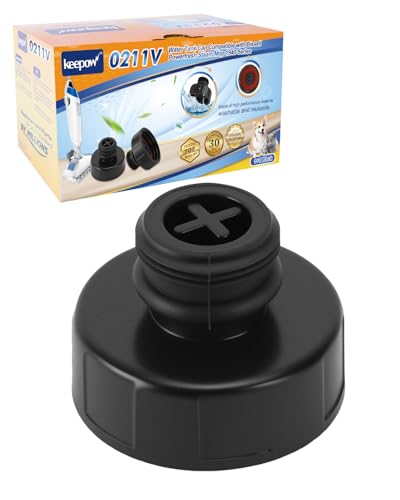
Steam Mop Replacement Parts Compatible with Powerfresh Steam Mop 1940 Serie
- Compatibility with Powerfresh 1940: Fits multiple Bissell Powerfresh models
- Secure Leak-Free Seal: Precision threaded water tank cap
- Durable Heat-Resistant Material: Made from ABS and heat-resistant plastics
As an affiliate, we earn on qualifying purchases.
As an affiliate, we earn on qualifying purchases.
What Recent Tech Advances Mean for Your Steam Mop’s Reliability
Newer steam mop models feature faster heat-up times and smarter cleaning systems. Some come with automatic descaling and maintenance alerts, reducing manual upkeep. These innovations are designed to address common pain points—like mineral buildup and user oversight—by integrating intelligent features that monitor and maintain optimal operation.
For example, self-cleaning cycles now clear mineral buildup automatically, which not only saves time but also prevents long-term damage caused by mineral deposits. Smart sensors monitor temperature, water flow, and even detect when cleaning pads need replacement, alerting you proactively. These advancements mean less guesswork and more consistent performance, but they do not eliminate the need for regular maintenance. Over-reliance on tech without proper care can still lead to issues, so understanding how to balance new features with routine upkeep is key.
Ultimately, these technological improvements make steam mops more reliable and easier to use, but they should complement—rather than replace—good maintenance habits.
Key Facts You Need to Know About Your Steam Mop
- Most steam mops heat up within 30 seconds to 2 minutes. This quick heat-up time is vital for efficiency, especially when multitasking or cleaning large areas, reducing downtime and frustration.
- Over 70% of failures stem from mineral deposits blocking nozzles, especially with hard water. This highlights the importance of water quality and regular descaling to maintain consistent steam output.
- Using distilled water can cut mineral buildup by over 80%. Choosing proper water minimizes internal deposits, which directly impacts device longevity and cleaning performance.
- Safety features like automatic shut-off activate if the device overheats or is left idle too long. These features protect both the user and the device, preventing damage and ensuring safe operation.
- Regular descaling extends the lifespan by up to 50%. Incorporating routine descaling into your maintenance schedule can significantly prolong your device’s effective life, saving money and reducing replacement frequency.
Frequently Asked Questions
Can mineral deposits clog my steam mop?
Yes, mineral buildup from hard water is a leading cause of clogged nozzles and reduced steam. Using filtered or distilled water can help minimize this issue.How often should I descale my steam mop?
Depending on usage and water quality, descale every 2-3 months or when you notice a drop in steam output. Follow your manufacturer’s instructions for best results.Is it safe to use vinegar to clean my steam mop?
Many manufacturers advise against vinegar, as it can damage internal components. Check your manual for recommended descaling agents or use specialized descaling solutions.My steam mop heats up but still doesn’t produce steam. What now?
Check for nozzle blockages, ensure the water tank is seated correctly, and inspect the heating element for damage. If these don’t help, professional repair may be needed.When should I replace my steam mop?
If frequent repairs are needed or it no longer produces steam despite troubleshooting, replacing it might be more cost-effective than repairing.Conclusion
When your steam mop stops steaming, don’t panic. Often, the fix is simple—clean, descale, or check your water supply. Remember, regular maintenance is your best defense against unexpected breakdowns.
Think of your steam mop as a trusted tool that rewards care with clean floors and fresh air. Keep it in good shape, and it will serve you well for years to come.
Grilling season Picks
grills
As an affiliate, we earn on qualifying purchases.