TL;DR

Get cleaning gear delivered free — and shop member deals
- Fast, free delivery on millions of items
- Access to Prime Big Deal Days deals on October 6–7
- Prime Video, Amazon Music and more included
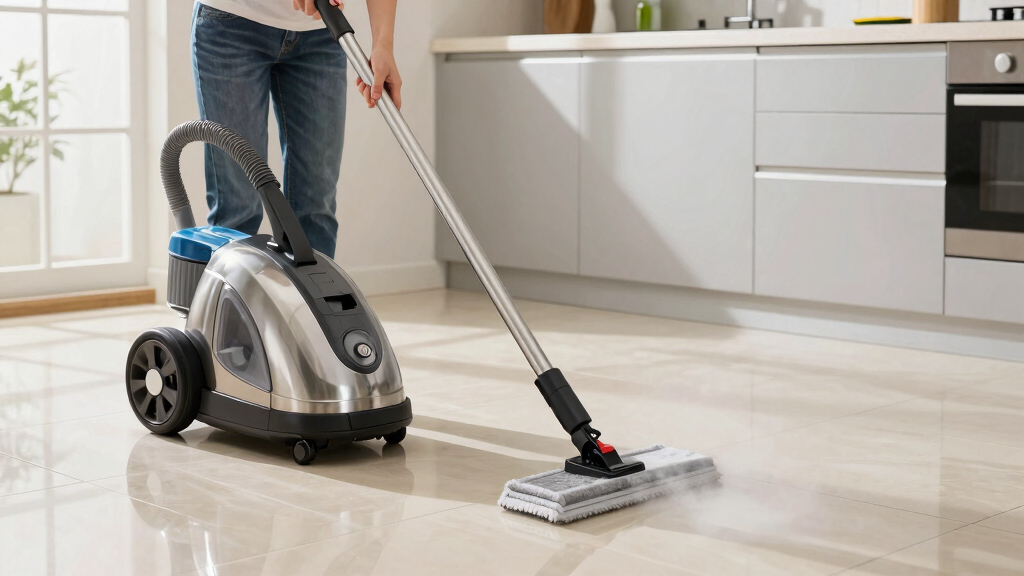
Maintaining your steam mop involves regular water tank cleaning, using distilled water, cleaning pads frequently, and descaling as needed. Proper upkeep can extend its life by several years and keep it safe to use.
Always empty and rinse your water tank after each use to prevent mold and mineral buildup.
Use distilled or filtered water to keep internal components clean and avoid clogging.
Clean microfiber pads regularly and replace when worn to maintain cleaning effectiveness.
Perform descaling every 1-3 months with vinegar or manufacturer-approved solutions to prevent mineral deposits.
Inspect and replace worn parts promptly to ensure safety and avoid breakdowns.
How to Clean Your Water Tank Without Damaging It
Cleaning your steam mop’s water tank regularly is the foundation of good maintenance. It prevents mineral buildup, mold, and foul odors. After each use, empty the tank to avoid stagnant water that breeds bacteria. Periodically, rinse it with plain water or a vinegar solution—about 1 part vinegar to 3 parts water—to dissolve any lingering deposits.
For example, if your water tank smells musty after a few months, a quick vinegar rinse can freshen it up. Use a soft cloth to wipe the inside gently, and avoid abrasive scrubbers that could scratch the plastic. Keeping this step routine ensures your steam output stays consistent and your floors stay sanitized. Neglecting this step can lead to mineral deposits that clog internal channels, reducing steam efficiency and possibly damaging internal components over time. Regularly cleaning the tank means your device maintains optimal performance, saving you money on repairs and replacements in the long run.
As an affiliate, we earn on qualifying purchases.
Why Using Distilled or Filtered Water Matters Most
Using distilled or filtered water in your steam mop isn’t just a tip — it’s a game-changer. Tap water, especially hard water, contains minerals that can clog nozzles and leave unsightly deposits inside your device. Over time, this reduces steam power and can cause internal damage. Mineral buildup can also lead to inconsistent steam output, making cleaning less effective and requiring more frequent maintenance or repairs.
For instance, in areas with high mineral content, mineral deposits can build up within 3-4 months, even faster if you don’t switch to better water. According to an anonymous researcher, up to 80% of common steam mop repairs relate to mineral buildup. Switching to distilled water can extend your mop’s life by years and keep steam consistent as new. While it may seem like an extra step or expense, using distilled water prevents the internal corrosion and clogging that shortens your device’s lifespan. This simple change can save you money and frustration while ensuring your floors are cleaned effectively every time.
As an affiliate, we earn on qualifying purchases.
Cleaning and Replacing Your Microfiber Pads — Keep Dirt Out of Your Floors
Microfiber pads are your floor’s best friend, but only if they’re clean. Wash them after every few uses, following the manufacturer’s instructions. Usually, tossing them in the washing machine with mild detergent is fine. Avoid fabric softeners—they leave residues that reduce cleaning power.
When pads get frayed or excessively dirty, replace them. Think of it like changing a dirty sponge—dirty pads spread dirt instead of removing it. A clean pad can lift stubborn grime and dust, making your floors gleam without streaks or smudges. However, choosing the right replacement pads and changing them regularly is a tradeoff. Using worn or inappropriate pads can reduce cleaning effectiveness, cause streaks, or even scratch floors. Regularly inspecting and replacing pads ensures your cleaning remains efficient and prevents dirt from being redistributed, which can cause buildup over time and diminish the longevity of your floors and device.
As an affiliate, we earn on qualifying purchases.
How to Descale Your Steam Mop Without Damaging It
Descaling keeps your steam mop humming at full power. Use vinegar diluted with water—about 1 part vinegar to 2 parts water—and run this mixture through your device when you notice a decline in steam output or after 2-3 months of heavy use. Always check your manufacturer’s guidelines first. Proper descaling is crucial because mineral deposits can clog internal channels and nozzles, drastically reducing efficiency and risking permanent damage if ignored.
For example, if your mop produces only a trickle of steam, descaling can often restore full pressure. Regular descaling not only improves performance but also extends the lifespan of internal components. Skipping this step can lead to mineral buildup that causes clogging, leaks, or even damage to internal seals. By descaling at recommended intervals, you ensure your device maintains peak performance and safety, avoiding costly repairs or early replacements.
best distilled water for steam mop
As an affiliate, we earn on qualifying purchases.
As an affiliate, we earn on qualifying purchases.
Cleaning Nozzles and Attachments for Peak Performance
Clogged nozzles are common culprits for poor steam production. Use a small pin or needle to clear any obstructions in the spray holes. Wipe down attachments with a damp cloth to remove dust, hair, and residue that can block steam flow.
For example, if your steam mop suddenly sputters or leaks, a quick needle cleaning can often fix the problem. Regular checks prevent buildup and ensure your floors get the deep, consistent steam they deserve. Neglecting nozzle maintenance can lead to uneven steam distribution, which reduces cleaning effectiveness and may cause the device to overwork, increasing wear and tear. Keeping nozzles clear ensures optimal steam flow, prolongs device life, and guarantees your floors are thoroughly sanitized each time.
Inspect and Replace Worn Parts Before They Fail
Regularly inspecting seals, cords, and other components can prevent sudden breakdowns. Look for cracks, frayed wires, or worn-out seals — especially around the water tank and power cord. Replace damaged parts promptly to keep your device safe and efficient. Addressing worn parts early reduces the risk of electrical hazards, leaks, or complete device failure, which can be costly and inconvenient.
Imagine pulling out your steam mop for a deep clean, only to find the cord frayed. Replacing that cord now ensures you avoid electrical hazards and keeps your mop working smoothly for the next big cleaning day. Preventative maintenance like this is essential for safety and for extending the overall lifespan of your device, saving you money and hassle in the long run.
Best Storage Tips to Keep Your Steam Mop Ready to Go
Storing your steam mop properly prolongs its life. After cleaning, let it cool completely before winding the cord loosely and storing it in a dry, cool place. Keep the mop upright or hang it to prevent damage to the nozzle and internal parts.
For example, in your closet, a dedicated hook keeps the mop off the ground, avoiding accidental bumps or dust buildup. Proper storage prevents corrosion, mold, and damage, readying your device for the next cleaning session. Improper storage can lead to internal corrosion, mold growth, or physical damage, all of which compromise performance and safety. Investing a little time in correct storage ensures your steam mop remains in top condition, ready for use whenever you need it, and extends its overall lifespan.
What Are the Latest Innovations That Make Maintenance Easier
Modern steam mops now feature cordless designs, digital water level indicators, and self-cleaning modes. These innovations reduce user effort and help maintain performance. For instance, cordless models eliminate cord tangles, making it easier to clean in hard-to-reach areas.
Enhanced filtration systems catch minerals before they clog the device, and some units include automatic descaling alerts. These features simplify maintenance, reduce the need for manual descaling, and help you catch issues early before they lead to costly repairs. Staying aware of these innovations can help you pick a model that’s easier to keep in top shape—saving time and headaches, and ultimately prolonging the device’s useful life.
Frequently Asked Questions
How often should I clean my steam mop?
Clean the water tank and pads after every use. Descale every 1-3 months, depending on water hardness and usage frequency. Regular maintenance keeps it running smoothly and extends its life.
Can I use tap water in my steam mop?
It depends on your water’s mineral content. In areas with hard water, distilled or filtered water is best to prevent clogs and buildup. Check your manufacturer’s recommendations for guidance.
What if my steam mop isn’t producing enough steam?
Check for clogged nozzles, ensure the water tank is full, and run a descaling cycle if needed. Clearing blockages and removing mineral deposits can restore full steam performance.
How do I remove stubborn mineral deposits?
Use a vinegar-water mixture or a descaling solution recommended by the manufacturer. Run it through the system to dissolve deposits, then rinse with plain water before use.
Are there safety precautions I should follow?
Always unplug before cleaning, handle hot parts with care, and avoid overfilling the water tank. Proper maintenance reduces safety hazards and prolongs your device’s life.
Conclusion
A well-maintained steam mop is a reliable partner that keeps your floors shining without fuss. Regular cleaning, using the right water, and attentive part care make all the difference. With these simple steps, your device will serve you faithfully for years to come—and your floors will thank you for it.Halloween Picks
halloween
As an affiliate, we earn on qualifying purchases.