TL;DR
Open a free Amazon Business account
Business pricing, bulk buying and tax-exempt orders.
Create a free accountAs an affiliate, we earn on qualifying purchases.
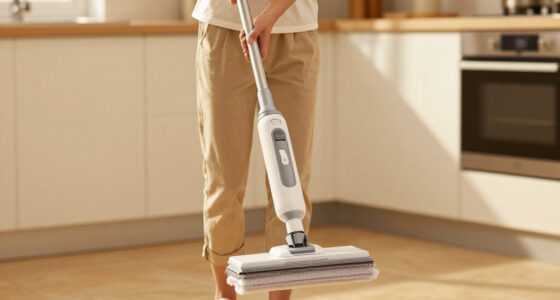
If your steam mop won’t turn on, check the power source, inspect the water tank, and look for electrical faults. Many issues are simple to fix with basic troubleshooting; always follow safety precautions.
Nothing’s more frustrating than pressing the power button on your steam mop, only to get nothing back. You expect that warm, steam-filled promise of clean floors, but instead, silence and dead silence. Before you assume it’s a major repair, remember—many common issues are simple to troubleshoot.
This guide walks you through a straightforward checklist. You’ll learn how to spot electrical problems, water issues, and component failures. Keep your safety in mind, and you might surprise yourself with how quickly you get your steam mop back in action.
Always test the power outlet with another device before assuming your mop is faulty.
Check the water tank for proper filling and leaks—many issues stem from water supply problems.
Inspect internal wiring and connectors for damage or looseness; safety first, and consider professional repair for internal faults.
Reset your device by unplugging for 5 minutes; this simple step often clears minor glitches.
Follow manufacturer instructions for maintenance—regular descaling and correct storage prolong your mop’s life.
Check the Power Supply—Is Your Outlet Working?
The first step is ensuring your steam mop is getting power. Plug it into a different outlet or test the current outlet with another device. Sometimes, the issue isn’t the mop but the socket itself. If the outlet is dead, no amount of troubleshooting will make the mop turn on.
For example, a user once found their entire kitchen outlet was dead due to a tripped breaker. Resetting the breaker restored power, and the mop powered up immediately.
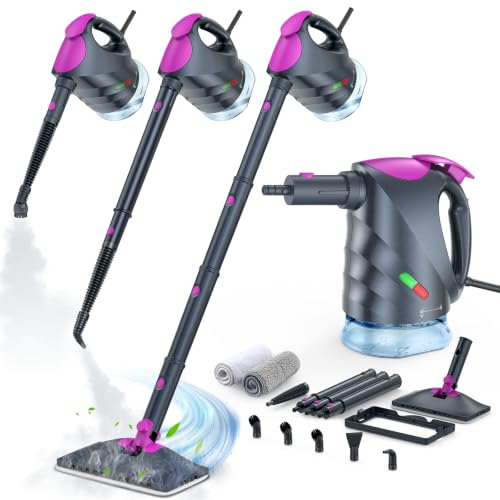
Steam Mop & Detachable Handheld Steam Cleaner
- Versatile Steam Cleaning: Switch between mop and handheld with 8 attachments
- Chemical-Free Deep Cleaning: Uses high-temperature steam up to 248°F
- Fast Heat-Up: Ready in just 10 seconds
As an affiliate, we earn on qualifying purchases.
As an affiliate, we earn on qualifying purchases.
Inspect the Water Tank & Water Level
Many steam mops refuse to turn on if the water tank isn’t properly filled or if there’s a clog. Check if the tank is filled to the recommended level. Some models have a water sensor that prevents startup if the water isn’t detected.
Imagine you’re about to mop, but the device stays dead. You realize the water tank was accidentally drained after your last cleaning. Filling it again can often resolve the issue.
Understanding the importance of the water level is crucial because a low or empty tank often triggers safety features that prevent operation, protecting the device from damage. Ignoring this can lead to confusion or repeated troubleshooting without addressing the root cause.

Angoily 2Pcs Water Level Indicator 14.17" Water Level Plant Reminder Meter
- Plant Water Indicator: Helps plants grow healthy and strong
- Water Level Gauge: Shows water level with floating buoy
- No Batteries Needed: Plug and use, no electricity required
As an affiliate, we earn on qualifying purchases.
As an affiliate, we earn on qualifying purchases.
Verify Internal Wiring & Connections
Loose wires or damaged internal components are common culprits. Unplug the mop, then carefully inspect accessible wiring and connections for visible damage or disconnection. If you see frayed wires or burnt components, professional repair is safest.
A common scenario: a user noticed their mop stopped working after a fall. A loose wire inside was the culprit, easily reconnected after opening the device following safety precautions.
Addressing internal wiring issues promptly can prevent further damage or safety hazards. However, internal electrical components can be delicate; improper handling may cause shorts or further damage, so consider consulting a professional if unsure.

Klein Tools RT110 Outlet Tester, AC Electrical Receptacle Tester for North American Outlets
- Clear Light Sequence: Indicates wiring status with light patterns
- Certified Safety Standards: UL and CSA compliant for safety
- Wide Temperature Range: Operates from 32°F to 140°F
As an affiliate, we earn on qualifying purchases.
As an affiliate, we earn on qualifying purchases.
Reset or Power Cycle Your Device
If your steam mop has a reset button, press it. Otherwise, unplug it and wait 5 minutes before plugging back in. This simple step can reset internal circuits, clearing minor glitches that prevent startup.
One user found their model wouldn’t turn on after a power surge. Unplugging and waiting reset the internal system, restoring normal function.
Performing a reset can resolve temporary faults caused by power fluctuations or minor software glitches. While often effective, it’s important to recognize that persistent issues may indicate deeper electrical or component failures requiring professional attention.
steam mop internal wiring repair kit
As an affiliate, we earn on qualifying purchases.
As an affiliate, we earn on qualifying purchases.
Examine the Heating Element & Safety Features
The heating element is critical for producing steam. If it’s faulty, the mop won’t turn on or heat up. Some models include safety features that disable power if overheating or internal faults occur. Visual inspection isn’t enough—consult a technician if you suspect this issue.
For example, a mop stopped heating, and a professional diagnosed a broken heating coil. Replacing it restored full functionality.
Understanding the role of the heating element and safety features is vital because a failure here not only prevents operation but could also pose safety risks like overheating or electrical faults. Recognizing these signs early and seeking professional repair can prevent further damage and ensure safe operation.
Test the Control Panel & Buttons
Sometimes, the power button or control panel is unresponsive due to dirt, residue, or internal failure. Press all buttons firmly, clean around the panel, and if it still doesn’t respond, the switch or control board may need replacing.
A cleaner found her button was sticky from spilled cleaning solution. Cleaning and gentle pressing restored responsiveness.
It’s important to understand that unresponsive controls can be caused by accumulation of residues or mechanical wear, which over time can impair your mop’s ability to communicate commands. Proper cleaning and cautious handling can prolong control panel life, but persistent issues may require professional repair or replacement of internal parts.
Compare Your Model’s Features & Troubleshooting Options
| Issue | Common Cause | Fix |
|---|---|---|
| Won’t turn on | Electrical fault or water sensor issue | Check power outlet, water level, reset device |
| Heats but no steam | Heating element or water inlet clog | Inspect heating coil, clear water inlet |
| Buttons unresponsive | Control panel damage or dirt | Clean buttons, replace control panel if needed |
Frequently Asked Questions
Why won’t my steam mop turn on even though it’s plugged in?
This could be due to a faulty power outlet, a damaged power cord, or an internal electrical issue. Try plugging into a different outlet and inspecting the cord for damage. If it still doesn’t work, internal wiring or fuse problems might be the cause, best checked by a professional.
How do I reset my steam mop?
Many models have a reset button or require unplugging for about 5 minutes. This resets internal circuits and can fix minor glitches. Always check your user manual for specific instructions for your model.
What if my water tank is full but the mop still won’t turn on?
There may be a clog in the water inlet, a faulty water sensor, or internal damage. Inspect the water inlet and sensor, and clean or replace them if needed. Sometimes, removing and refilling the tank helps reset the water detection system.
Can I repair my steam mop myself?
Basic issues like resetting, cleaning, or inspecting visible wires can be done at home. However, for internal electrical faults or component replacements, it’s safer to consult a repair professional to avoid safety hazards.
Are there safety concerns if my steam mop doesn’t turn on?
Yes, especially if you suspect electrical faults or internal damage. Always unplug the device before inspecting or attempting repairs, and avoid opening sealed components unless qualified.
Conclusion
When your steam mop refuses to turn on, patience and a systematic approach go a long way. Many problems are simple to fix—sometimes just a loose wire or an overlooked water tank can cause frustration. Remember, safety first—if you’re unsure, consult a professional.
Keep your cleaning tool in top shape with regular maintenance, and don’t hesitate to replace faulty parts promptly. Your floors—and your nerves—will thank you.
Summer Picks
summer essentials
As an affiliate, we earn on qualifying purchases.