TL;DR

Get cleaning gear delivered free — and shop member deals
- Fast, free delivery on millions of items
- Access to Prime Big Deal Days deals on October 6–7
- Prime Video, Amazon Music and more included
Fill your steam mop’s tank to the manufacturer’s recommended line for best results. Using the correct water type and avoiding overfilling prevent damage and ensure effective cleaning. Modern models often offer adjustable settings to optimize water use.
Ever wondered if you’re putting in too much or too little water? The right amount can mean the difference between a sparkling clean floor and a clogged, damaged device. It’s a small detail, but it’s often overlooked—yet it directly impacts your cleaning results.
In this guide, you’ll learn how to fill your steam mop correctly, what type of water to use, and how recent innovations are making this process easier and more eco-friendly. Let’s clear up the mystery around water levels once and for all.
Always fill your steam mop to the manufacturer’s recommended line for safe, effective cleaning.
Use distilled or demineralized water to prevent mineral buildup and prolong device lifespan.
Avoid overfilling to prevent leaks and damage—think of it like not overfilling a cup.
Modern models offer adjustable steam settings, helping you use just the right amount of water.
Regular maintenance, including emptying and descaling, keeps your steam mop performing at its best.
Follow the Manufacturer’s Water Line — It’s Your Best Bet
The simplest trick? Always fill the water tank up to the line marked on your steam mop. This line is designed to prevent overfilling, which can cause leaks, or underfilling, which results in weak steam. Imagine trying to clean a stubborn stain—if your tank’s half-empty, your steam may be too weak to do the job.
For example, a typical steam mop might have a 300 ml tank with a clearly marked fill line. Filling it beyond that risks water spilling out or damaging the internal parts. Conversely, filling below the line means less steam, and more trips to refill mid-clean.
Properly following this line ensures your device operates at optimal pressure, providing consistent steam that penetrates grime effectively. Overfilling can cause water to escape during use, leading to potential electrical hazards or damage. Underfilling, on the other hand, results in insufficient steam, making your cleaning less effective and requiring more frequent refills, which interrupts your workflow. Think of the fill line as a safeguard to balance performance and safety.
As an affiliate, we earn on qualifying purchases.
What Water Type Works Best? Distilled or Tap?
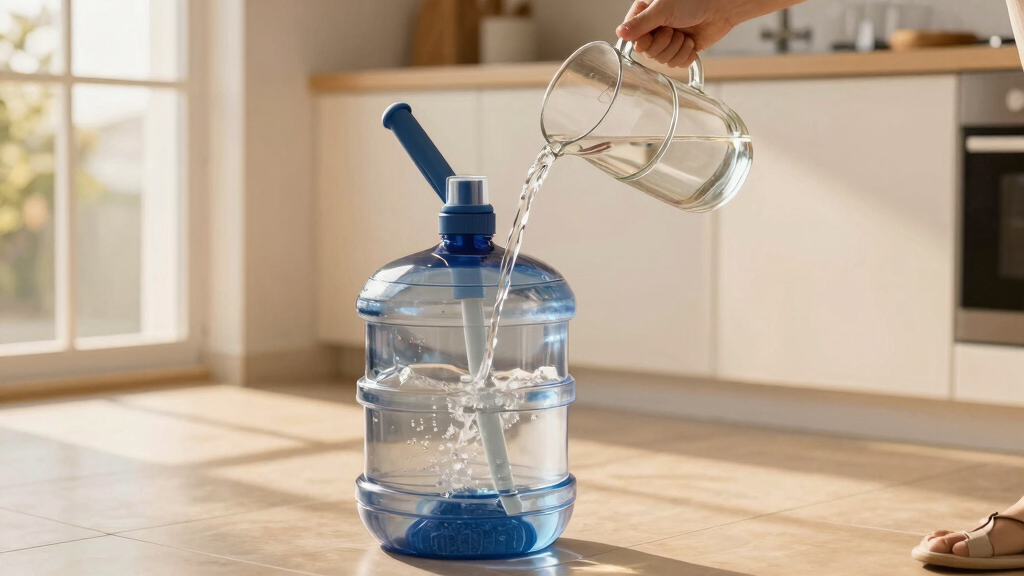
Using the right water can make or break your steam cleaning. Distilled or demineralized water is best because it prevents mineral buildup inside your device, which can clog steam outlets and reduce lifespan. Mineral deposits from hard water can accumulate over time, leading to decreased efficiency, costly repairs, or even the need to replace your device prematurely.
For instance, if you live in an area with hard water, opting for distilled water isn’t just a recommendation—it’s a way to extend your device’s lifespan. Some models are designed to tolerate tap water, but even then, frequent descaling and cleaning are necessary to prevent mineral deposits from forming. Using the wrong water type can cause internal damage that isn’t covered by warranty, so understanding your water source and choosing accordingly can save you money and frustration in the long run.
Additionally, the choice of water impacts cleaning effectiveness. Mineral buildup can block steam outlets, resulting in inconsistent steam flow and reduced cleaning power. Therefore, selecting the appropriate water type is a tradeoff between convenience and maintenance costs, with distilled water generally offering the best balance for longevity and performance.
As an affiliate, we earn on qualifying purchases.
How Much Water Is Too Much? Avoiding Overfilling
Overfilling your steam mop can have serious consequences beyond just leaks. Excess water can cause internal components to become saturated, increasing the risk of electrical shorts or damage to the heating element. Moreover, it can lead to unsafe operation, such as water escaping during use, which might cause slips or electrical hazards. Think of it like pouring too much water into a delicate machine—the excess can overwhelm and impair its functioning.
Many modern steam mops are equipped with safety features like overflow protection or automatic shut-off when the water exceeds a certain level. Ignoring these warnings or forcing water past the designated fill line can void warranties or cause irreversible damage. The tradeoff is clear: overfilling may seem like a quick way to extend your cleaning session, but it can compromise your device’s safety and longevity. Always adhere to the maximum fill line to ensure your device operates safely and efficiently, avoiding costly repairs or replacements down the line.
As an affiliate, we earn on qualifying purchases.
How Often Do You Need to Refill? Keep It Steady
The frequency of refilling depends on your cleaning area, the size of your water tank, and the intensity of use. A typical 300 ml tank might last about 15-20 minutes of continuous steaming, but this can vary based on the water temperature and the amount of steam your model produces. For larger areas, like a kitchen or living room, expect to refill once or twice during a session. This ensures your steam remains consistent and effective, preventing interruptions that could compromise cleaning quality.
Many newer models include indicator lights or sounds that alert you when water is running low. Recognizing these signals early allows you to plan refills without losing momentum. For example, if your device signals low water after 10 minutes, having a small jug nearby enables quick top-ups, keeping your cleaning routine smooth and efficient. Regularly monitoring and refilling your tank prevents the device from running dry, which can cause it to overheat or produce weak steam, ultimately extending its lifespan and maintaining optimal cleaning performance.
As an affiliate, we earn on qualifying purchases.
Comparison Table: Water Amounts & Cleaning Effectiveness
| Tank Size | Recommended Fill Level | Approximate Run Time | Notes |
|---|---|---|---|
| 200 ml | Up to marked line | 10-15 minutes | Good for small rooms or quick clean-ups |
| 300 ml | Up to marked line | 15-20 minutes | Popular size, balanced for most homes |
| 400 ml | Up to marked line | 20-25 minutes | Ideal for large areas, but heavier to handle |
Recent Trends: Eco-Friendly and Adjustable Settings
Many new steam mops now let you control how much water and steam you use. Some models even have eco modes that cut water use by 30-50% while still delivering effective cleaning. For example, a cordless, compact model might only need 150 ml for a 10-minute quick clean.
Plus, filters and water purification options help prevent mineral buildup, making your device last longer. These features let you customize your water use based on your cleaning needs.
How to Maintain Your Water System for Best Results
Regularly emptying the water tank after each use prevents mold, bacteria, and mineral buildup. Some models recommend rinsing the tank with plain water weekly. If you notice reduced steam or a strange smell, it might be time for a descaling process.
For example, filling the tank with a mixture of water and vinegar once a month can dissolve mineral deposits and keep the internal components clean. Proper maintenance not only ensures consistent steam quality but also prolongs the life of your device. Following your manufacturer’s cleaning instructions is essential for optimal performance and safety, especially when it comes to descaling and tank hygiene.
Frequently Asked Questions
How much water should I put in my steam mop?
Fill the tank up to the manufacturer’s marked fill line, usually around 200-400 ml. Always check your device’s instructions for the exact amount.Can I use tap water in my steam mop?
It depends on your model. Distilled or demineralized water is best to prevent mineral deposits, but some models tolerate tap water with regular descaling.What if I overfill or underfill the water tank?
Overfilling can cause leaks or damage, while underfilling results in weak steam. Always stay within the recommended fill line.How often should I refill the water?
It varies by tank size and cleaning area, but expect to refill every 15-20 minutes for typical use. Watch for indicator lights or sounds.Can I add cleaning solutions to the water?
Most steam mops are designed for water only. Adding chemicals can damage the device or release harmful fumes—check your manual first.Conclusion
Getting the water level right isn’t just a minor detail — it’s the key to a spotless floor and a long-lasting device. Think of your steam mop as a delicate tool; treat it with respect by following the fill lines and using the right water.
Next time you clean, remember: less guesswork means better results. Your floors will thank you with every streak-free shine.
Fall Picks
fall essentials
As an affiliate, we earn on qualifying purchases.