TL;DR

Get cleaning gear delivered free with Prime
- Fast, free delivery on millions of items
- Prime Video, Amazon Music and more included
- Member-only deals all year
A steam mop may be beyond practical repair if it still will not heat after basic checks, leaks from its body, trips a breaker, smells burnt, or repeatedly overheats. Unplug it, let it cool, and follow its manual to check simple causes such as a loose tank, clogged nozzle, or dirty pad. Leave electrical faults to a qualified repairer, then compare the repair quote, parts availability, warranty, and replacement cost.
A steam mop that suddenly goes quiet can have a very ordinary problem: a tank that is not seated, a pad clogged with grime, or mineral buildup in the steam path. But a burnt smell, water leaking from the body, or a breaker that trips is a different story. Those are signs to stop and put safety ahead of one more cleaning pass.
This guide helps you tell the difference between a simple maintenance issue and a fault that may call for professional repair or replacement. You’ll learn what to check safely, which symptoms deserve immediate attention, and how to weigh the repair cost against parts, warranty, and the price of another mop. Always follow your model’s manual, and test any floor-cleaning method on a hidden area first.
Check the outlet, tank fit, warm-up time, pad, and manual-approved nozzle care before deciding a steam failure means the mop is broken.
Unplug and stop using a mop that leaks from its body, trips a breaker, sparks, smells burnt, or repeatedly overheats.
Symptoms can point toward a heater, pump, thermostat, or control fault, but a qualified repairer may need to confirm the cause.
Compare the repair quote, available parts, warranty, age, and replacement cost before deciding what is practical.
Follow both flooring and mop manufacturer guidance before steaming hardwood, laminate, vinyl, or LVP; test a hidden area first.
Home care · Repair guide
How to Tell If Your Steam Mop Is Beyond Repair
Separate a simple maintenance issue from a fault that needs professional attention. Start with safe checks, recognize the stop signs, then weigh repair against replacement.
Start with the safe checks
A mop that suddenly stops steaming may have a straightforward cause. Unplug it, let it cool, and follow the exact instructions for your model.
Outlet and cord
Confirm the outlet works with another small appliance. Look for visible cord or plug damage without touching exposed wiring.
Tank fit and fill
Fill only to the marked level and make sure the tank locks securely into place.
Full warm-up
Wait for the warm-up time stated in the manual. Some models need several minutes.
Pad and steam path
Fit a clean, correctly sized pad. Clean the nozzle or descale only as the manufacturer directs.
Approved replacement parts
Check whether model-approved seals, tanks, filters, or other user-replaceable parts are available.
A simple blockage
A clogged pad or mineral buildup can reduce steam. Follow model-specific guidance; avoid one-size-fits-all fixes.
Do not open the casing or inspect internal wiring unless qualified. Use vinegar or another descaler only if your manual permits it.
When a symptom means stop
Symptoms can point toward a heater, pump, thermostat, sensor, or control fault. A qualified repairer may need to confirm the cause.
Still cold after basic checks
If the outlet, tank, pad, and full warm-up are confirmed but steam never comes—or repeatedly stops—the heater, pump, or an internal connection may have failed.
Arrange diagnosisLeak from housing or base
A loose tank or replaceable seal may be simple. A crack, persistent body leak, or water near electrical parts is a serious concern.
Unplug and stopBreaker trips, sparks, or burnt smell
These are electrical warning signs. Do not repeat the test or keep resetting the breaker; keep clear of wet or exposed connections.
Stop immediatelyOverheats or shuts down repeatedly
A thermostat, sensor, or control issue may be involved. Persistent overheating is a safety concern and needs assessment.
Stop and assessUnusual noise or water spray
A clogged nozzle or mineral deposits may interrupt steam. If manual-approved cleaning does not help, the pump or steam path may be damaged.
Check manual, then repairDamaged cord or plug
Fraying, exposed wire, scorch marks, or an unusually hot plug can point to an electrical fault. Do not tape or splice the cord.
Qualified repairerMake the practical call
A blockage or replaceable part may make repair worthwhile. A heater, pump, or control board can cost more to repair, especially on an older or lower-cost model.
Compare the quote with parts availability, warranty coverage, the mop’s age and condition, and the price of a comparable replacement. Contact the manufacturer before paying for service; options and warranty terms vary by brand and location.
If you replace it, use an appropriate electronics recycling program where available. Follow both mop and flooring manufacturer guidance before steaming any floor, and test a hidden area first.
Bars are a checklist, not a score: gather the facts for your model before deciding.
| What you find | Practical next step | Signal |
|---|---|---|
| Loose tank, dirty pad, simple blockage | Follow the manual’s cleaning and fitting steps; try only approved replacement parts. | ✓ Check first |
| Persistent no-steam fault | Ask for a diagnosis and quote; compare the repair and available parts with replacement cost. | ~ Assess |
| Body leak, sparks, burnt smell, breaker trip, repeated overheating | Unplug and stop using it. Have it professionally assessed or replace it if repair is unsafe or uneconomical. | ✗ Stop use |
Start with the safe checks that can bring steam back
When a steam mop stops steaming, start with the outlet, tank, warm-up time, and pad before assuming a part has failed. Unplug the mop, let it cool, then check the manual for the exact tank fill line and warm-up instructions. A unit that needs several minutes to heat may seem broken if you expect steam right away.
- Check the outlet: Plug in another small appliance to see whether the outlet works. Look at the mop’s cord and plug for visible damage without touching exposed wiring.
- Seat and fill the tank: Make sure the tank is filled to the marked level and locked into place.
- Allow the full warm-up: Use the wait time listed in your model’s manual.
- Check the pad and steam path: Fit a clean, correctly sized pad. Clean the nozzle or descale only by following the manufacturer’s directions.
- Check available parts: Look for model-approved replacement seals, tanks, filters, or other user-replaceable components.
For example, if the tank sits a fraction too high after washing, the mop may not draw water properly. Re-seating it can solve the problem without tools. A fresh pad can also help: a heavy, wet pad may drag across tile and make it seem as if the mop is barely working.
Think of these checks like making sure a garden hose is connected and its nozzle is clear before blaming the pump. But don’t open the mop to inspect wires or internal parts unless you’re qualified. Never use vinegar or another descaler unless the manual allows it; the wrong product can damage some models. If the simple checks change nothing, note what the mop does and move on to symptom-based decisions.
Products Worth Considering

eufy E25 Robot Vacuum and Mop Combo with HydroJet Roller Mop

Roborock Q7 M5+ Robot Vacuum and Mop with Self-Emptying Dock

Bose TV Speaker (2nd Gen) Compact Soundbar with Bluetooth and HDMI Connectivity
As an affiliate, we earn on qualifying purchases.
Know when no steam points to a deeper fault
How to tell if your steam mop is beyond repair starts with what happens after you confirm the outlet works, the tank is seated, and the full warm-up time has passed. If it remains cold, never produces steam, or repeatedly stops steaming during normal use, a failed heater, thermostat, pump, or internal connection may be involved. Symptoms can suggest a cause, but a repairer may need to diagnose the exact part.
Imagine cleaning a small tiled entryway before guests arrive. The indicator light comes on, but after the manual’s stated warm-up period the mop still produces no steam. You check the tank and pad, let the unit cool, and try again according to the instructions. If nothing changes, repeating the same cycle is unlikely to reveal whether the heater or pump failed. It can, however, add more time and wear without producing useful evidence, so the next helpful step is to record the symptom and ask about diagnosis.
A blockage or mineral deposits can also interrupt steam, especially where the water supply contains more minerals. The manual may give a specific cleaning or descaling method, or it may direct you to use distilled or demineralized water. Follow that advice for your model; a one-size-fits-all remedy can create another problem. Maintenance is often less costly than replacing a pump, but aggressive cleaning can damage seals or coatings and turn a serviceable mop into a more expensive repair.
If cleaning the steam path as directed does not help, ask the manufacturer or a qualified repairer whether the heater or pump can be serviced and whether the part is available. Do not open the casing or probe electrical parts to make the diagnosis yourself. A persistent cold unit may be repairable, but the repair quote and parts supply will determine whether it is practical. A clear diagnosis matters because replacing a small serviceable part may be sensible, while a costly heater plus labor can approach the price of a comparable new mop.
Treat body leaks, sparks, and burnt smells as stop signs
A leak from the mop’s body, water near electrical parts, sparks, a burnt smell, or a tripped breaker means stop using it. Unplug the appliance if you can do so safely, keep clear of any exposed or wet electrical connection, and let it cool. Don’t run another test to see whether the symptom happens again. Water and electricity can create a shock hazard, while repeated power faults may worsen damage or affect the outlet or circuit.
Location matters. A tank that is loose or a seal designed to be replaced may cause a small leak that a manufacturer-approved part can fix. Water seeping from a crack in the housing or gathering around the base is more serious, especially if it could reach wiring. For instance, if you see a damp trail beneath the handle after the mop has been switched off, don’t assume it is harmless condensation; follow the manual’s guidance and have the cause assessed. The difference affects both safety and cost: an accessible seal may be inexpensive, while a cracked body can mean the appliance cannot reliably contain hot water or steam.
A damaged cord or plug deserves the same caution. Fraying, exposed wire, scorch marks, or a plug that feels unusually hot can point to an electrical fault. Don’t tape over damage, splice the cord, or keep resetting a breaker. A qualified repairer can assess whether repair is safe; if that option is unavailable or uneconomical, replacement may be the sensible choice. Ask for the cause, not just a part swap, so a fault in the cord or controls is not mistaken for a symptom of another problem.
Stop using a steam mop that sparks, smells burnt, trips a breaker, or leaks near electrical parts. An appliance fault is not worth risking an electric shock or further damage to your home.
When you contact the manufacturer or repairer, describe where the water appeared and what happened before the fault. Those details help them decide whether you should bring the appliance in or arrange a safe inspection.
Read strange noises, water spray, and repeated shutdowns carefully
Unusual rattling, water spraying instead of steam, overheating, and repeated shutdowns can result from a blockage, mineral buildup, a pump fault, or a problem with the thermostat or controls. Start by unplugging and cooling the mop, then check the manual for permitted nozzle cleaning and maintenance steps. If the symptom remains, leave internal diagnosis to a repairer. These clues help describe what is happening, but they do not identify a specific failed part on their own.
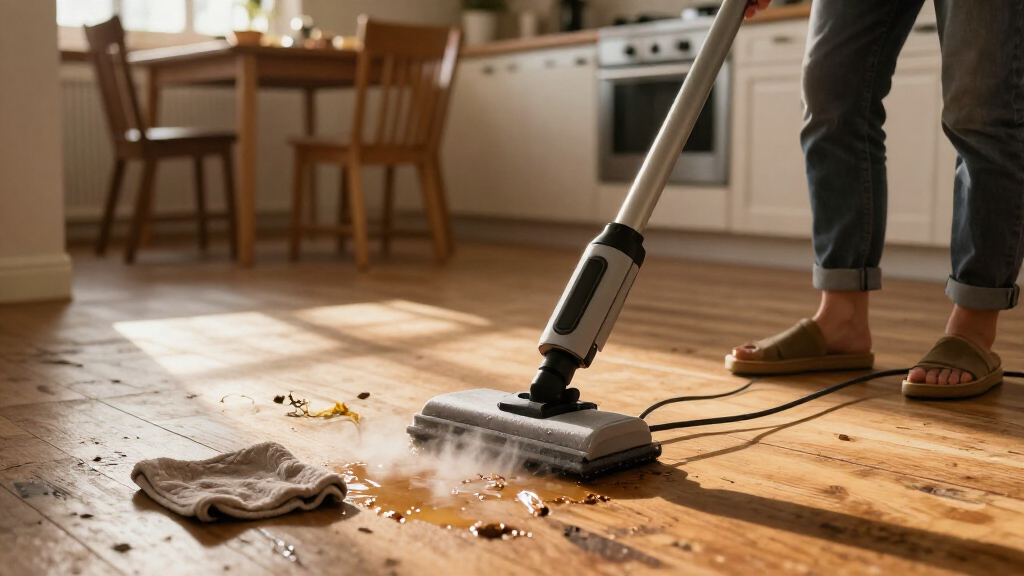
A sputtering mop might leave wet beads on a kitchen tile instead of a light, warm veil of steam. That can make the floor seem dirtier, and adding extra passes may leave too much moisture behind. A clogged nozzle or mineral deposit could be responsible, but if cleaning as directed does not stop the spray, the pump or steam path may need repair. Continuing to mop can spread water without cleaning effectively, and excess moisture can be a problem for floors whose seams or finish are vulnerable.
Repeated shutdowns deserve particular care. A mop that cuts out once may have a model-specific operating limit, but a unit that gets unusually hot, shuts off again and again, or behaves unpredictably should not be pushed through another room. A faulty thermostat, sensor, or control board could be involved; only inspection can confirm which part has failed. The shutdown may be a protective response, so restarting repeatedly could defeat the warning without addressing the cause.
Use a simple record to make the symptom clear: note whether the tank was full, how long the mop ran, whether it felt unusually hot, and whether it made a new sound. For example, “stops after three minutes and the handle feels hot” is more useful to a repairer than “doesn’t work right.” Stop using a mop that repeatedly overheats, and ask a qualified repairer or the manufacturer what to do next. A brief, specific description can help them decide whether a routine service visit is plausible or whether the unit should remain out of use pending inspection.
Compare repair and replacement before you spend
Repair makes sense when the fault is clear, the part is available, and the quote is reasonable for the mop’s age and condition. Replacement may be more practical when a major component has failed, a repair costs close to a comparable new mop, or needed parts are no longer sold. Check the warranty before paying for service; coverage and repair options vary by brand and location. The cheapest immediate option is not always the best value: a low-cost repair may be worthwhile if the mop is otherwise sound, while repeated repairs can add up if other worn parts are likely to fail soon.
| What you find | What to do next | What it may mean |
|---|---|---|
| Loose tank, dirty pad, or manual-approved cleaning needed | Correct the setup or follow the manual’s maintenance instructions | May be a simple fix |
| Replaceable seal or filter, with the correct part available | Ask whether it is an approved user-replaceable part | Repair may be practical |
| Failed heater, pump, or control part | Get a diagnosis and written quote | Compare the quote with the mop’s value and replacement cost |
| Body leak, cord damage, sparks, or repeated overheating | Stop using it and contact a qualified repairer or manufacturer | Safety assessment comes first |
Consider a five-year-old mop with a cracked housing and unavailable replacement parts. Even if a repair shop can patch it, a persistent leak may make that repair a poor choice. A younger unit with a replaceable seal and a small service charge is a different case. In both cases, ask what the repair will cover and whether the technician expects other parts to need attention; the estimate is more useful when it explains the scope and any limits.
There is no dependable lifespan that applies to every steam mop. Water quality, how often you use it, maintenance, storage, and build quality all play a part. Ask for the repair cost, part availability, warranty status, and likely repair scope, then compare those details with a suitable replacement. Consider not only purchase price but also whether the replacement fits your floors, storage space, and expected use. Don’t keep using an unsafe mop while you decide; store it unplugged and empty it only as the manual directs.
Protect your floors while you sort out the mop
A broken steam mop does not make steam cleaning the right choice for every floor. Check the flooring and mop manufacturers’ instructions before using steam on hardwood, laminate, vinyl, or luxury vinyl plank. Heat and moisture can damage some finishes or work their way into seams, and product guidance varies by floor construction and model.
For example, you may have a sealed tile floor in the kitchen but laminate in the hallway. A steam mop approved for the tile may not be suitable for the laminate, even if both floors look smooth and hard. Before using any approved cleaning method on an unfamiliar surface, test a hidden area and watch for changes in color, sheen, texture, or moisture at the edges.
While you wait for a repair decision, use a floor-care method the flooring maker permits. A dry microfiber dust mop can pick up crumbs and grit without adding moisture. For sticky marks, follow the floor maker’s instructions for a lightly damp cloth and suitable cleaner; avoid soaking seams or leaving puddles.
If your mop fails during a larger clean, don’t rush into buying another one just to finish the job. Check which surfaces in your home can safely be steam-cleaned, how much storage space you have, and whether a simple reusable cloth mop handles most of your floors. Surface compatibility comes first; no appliance is a good fit for a floor its manufacturer says it can damage.
Retire a failed mop without adding it to the landfill
If repair is unsafe, impossible, or too costly, retire the mop through an appropriate electronics recycling option where available. Check local e-waste rules or ask your municipality or retailer how to dispose of small appliances. Requirements vary, so use the instructions for your area and product.
Before taking it anywhere, unplug the mop and deal with leftover water as its manual directs. Don’t dismantle the appliance to separate wires, batteries, or internal parts unless the manufacturer specifically tells you to do so and you’re qualified. A cracked unit that once leaked should travel empty and packed so remaining water cannot spill in a car or collection bin.
As a practical example, a mop that trips the breaker and smells burnt should stay unplugged while you look up a local electronics collection point. That small pause is safer than leaving it beside the kitchen sink where someone might plug it in again. If it is still under warranty, contact the manufacturer first; they may explain return, repair, or disposal options.
Keeping the tank clean and storing the mop dry, as directed, can help reduce avoidable wear in the future. Follow the water guidance for your specific model, since some allow tap water while others recommend distilled or demineralized water. Repair what is safe and practical, then recycle what cannot be put back into reliable service.
Frequently Asked Questions
Why has my steam mop stopped steaming?
Common causes include a tank that is empty or not seated properly, insufficient warm-up time, a clogged steam path, or mineral buildup. Check those points using your model’s manual. If the mop still stays cold or repeatedly stops steaming, a heater, pump, thermostat, or internal connection may need professional diagnosis.
Can I descale a steam mop with vinegar?
Only if the manufacturer’s instructions for your model say vinegar is safe. Some products or parts can be damaged by vinegar or another unsuitable descaler. Follow the named cleaning method and water guidance in the manual.
Is it safe to use a steam mop that leaks?
Stop using it if water leaks from the housing or appears near electrical parts. Unplug it if you can do so safely, let it cool, and contact the manufacturer or a qualified repairer. A loose tank or replaceable seal may be repairable, but don’t assume a body leak is harmless.
How do I know whether the heater or pump has failed?
A mop that stays cold, fails to produce steam after basic checks, sputters, or sprays water may have a heater, pump, blockage, or steam-path problem. Those symptoms can guide a repairer but cannot reliably identify the failed part by themselves. Avoid opening the appliance unless you are qualified.
Is it worth repairing an old steam mop?
It depends on the repair quote, parts availability, warranty, age, and cost of a comparable replacement. A replaceable seal may justify repair, while an unavailable control board or costly heater may not. Stop using the mop while a safety fault is being assessed.
How long should a steam mop last?
There is no single dependable lifespan for every model. Use, water quality, maintenance, storage, and build quality all affect how long a mop works. Follow the manufacturer’s care instructions and keep an eye out for leaks, electrical damage, and repeated overheating.
Can I use tap water in my steam mop?
Follow the manual for your specific model. Some steam mops allow tap water, while others recommend distilled or demineralized water to reduce mineral buildup. Don’t switch water types or add cleaning products unless the manufacturer permits them.
What should I do with a steam mop I cannot repair?
Unplug it, empty or handle leftover water as the manual directs, and check local guidance for small-appliance or electronics recycling. Don’t dismantle it unless the manufacturer directs that step and you’re qualified. If it may still be covered by warranty, contact the manufacturer before disposal.
Conclusion
Start with the simple checks, then trust the warning signs. A loose tank or clogged steam path may be fixable, but a body leak, electrical fault, or repeated overheating calls for an unplugged mop and qualified advice. Compare a repair quote with parts availability, warranty, and replacement cost before spending.
When the mop cannot be returned to safe service, send it to an appropriate electronics recycling program. Better a quiet corner without a steam mop than a damp cord beside the kitchen sink.